
This is editorial research based on published specifications and product instructions, not a hands-on test. Check the exact model and seller details before buying. Affiliate links may earn us a commission. How we review ↗
i-box Dawn Review (2026): Wireless Charging, Dual Alarms and Real-World Tradeoffs
Published: July 2, 2026 | Updated: November 7, 2026 | Trending Deals Editorial
The i-box Dawn combines a bedside clock, FM radio, Bluetooth speaker and wireless phone charger. It can simplify a nightstand, but it is not a Wi-Fi smart clock or a guaranteed fast charger. Here is what to check before you buy one.
Key takeaways
- Useful all-in-one: Two alarms, Bluetooth stereo sound, FM radio and a Qi-compatible wireless charging pad share one bedside footprint.
- Brightness control: The manufacturer lists a five-level clock-display dimmer, not a separate adjustable underglow night-light.
- Charging has limits: Wireless charging requires a compatible device and proper alignment; an unverified “rapid charging” promise should not drive the purchase.
- Power still matters: The unit runs from its power adapter. Optional AAA backup batteries preserve clock/alarm settings during a power interruption; they do not power normal playback and charging.
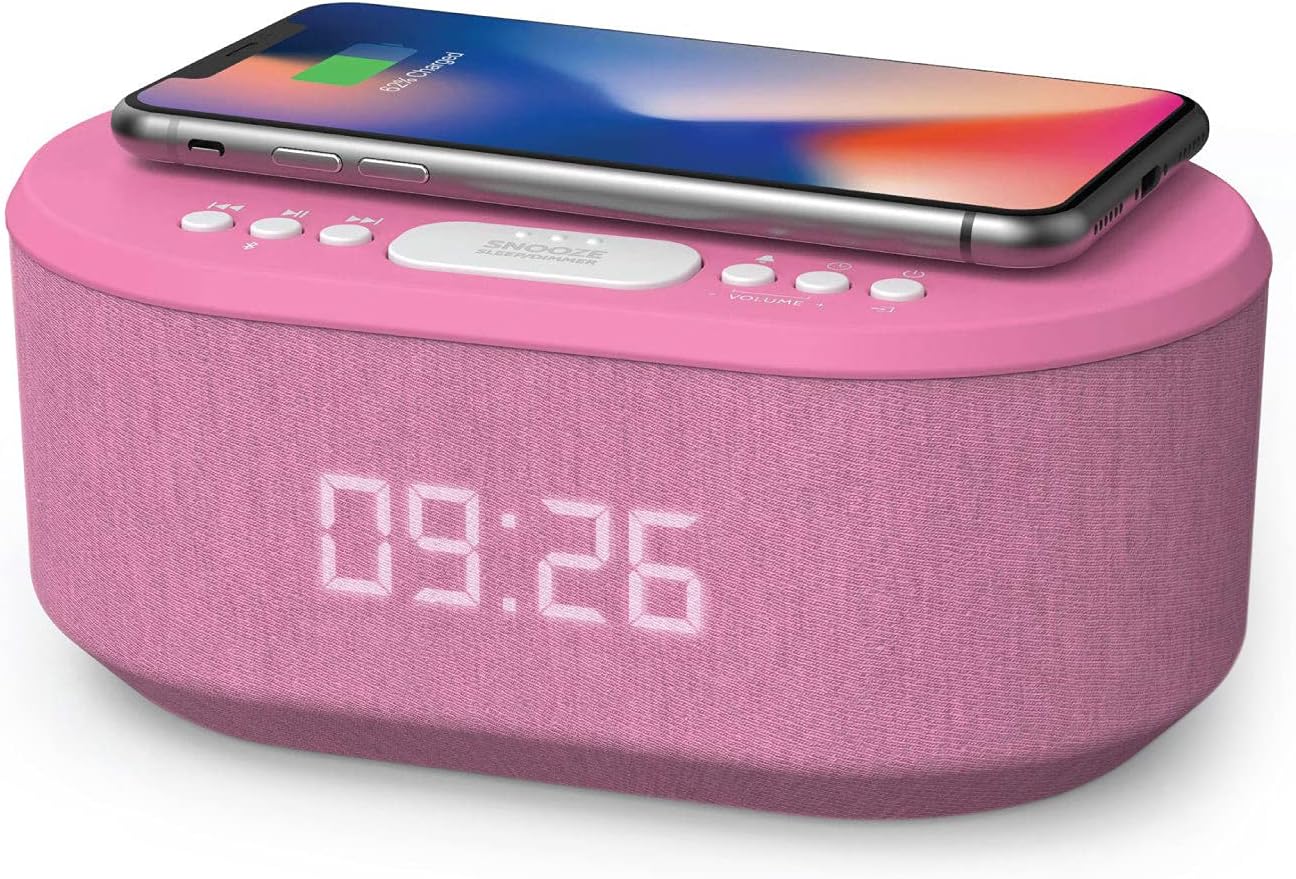
Quick verdict: is the i-box Dawn worth buying in 2026?
It makes sense for someone who wants an ordinary alarm clock with convenient bedside extras: a place to charge a compatible phone, music or podcasts over Bluetooth, and an FM radio. It is less compelling if you need the fastest phone charging, a true bedside lamp, voice-assistant automation or battery-powered operation.
The Dawn is better described as a multi-function alarm clock radio than a “smart alarm clock.” Its documented capabilities center on built-in controls, Bluetooth streaming and wireless charging; the manufacturer's specifications do not establish Wi-Fi, app control or smart-home integrations.
i-box Dawn specifications: what is actually documented?
i-box publishes regional product identifiers, including 79229PI/17 on its US site and 79224PI/14 on its UK site. These are documented examples, not a verified identification of the item behind this article's Amazon link. Confirm your retailer's exact variant before ordering.
| Feature | Manufacturer information / limitation |
|---|---|
| Wireless phone charging | Built-in pad for compatible wireless-charging devices; no verified power rating provided here |
| USB charging | One additional USB charging port; manufacturer lists 5 V output, not a USB-PD fast-charge feature |
| Alarms | Two separately programmable alarms; FM radio or buzzer on documented variants |
| Audio | Bluetooth streaming; stereo speakers rated at 2 × 3 W with bass radiator |
| Radio | FM with 10 preset slots; radio reception depends on location and antenna placement |
| Display | Five brightness levels for the clock display |
| Power | 5 V / 3.5 A adapter output; two optional AAA backup batteries for settings retention |
| Size (UK listing) | Approximately 26.8 × 11 × 14.5 cm; confirm space and regional adapter/plug |
These are published specifications, not measurements from our own testing. Source: i-box US Dawn product details and i-box UK Dawn product details.
Wireless charging: compatibility matters more than marketing
The top pad is convenient if your phone supports compatible wireless charging. But “wireless” does not mean every phone can charge: some budget models lack a charging coil, and protective accessories or misalignment can stop charging. Phone cases with metal elements, bulky attachments or magnetic accessories may interfere. Use the charging indicator to confirm that charging has begun before leaving your phone overnight.
Because we could not establish a manufacturer-backed wattage rating for the exact Amazon variant, we would not call this a rapid charger. Actual speed depends on the phone, alignment, temperature and charging implementation. If fast top-ups are your main goal, a dedicated, appropriately rated phone charger is a more straightforward choice.
The rear USB port provides a second wired charging option, but its presence does not imply USB-C Power Delivery or high-wattage laptop charging. Use it for a compatible small device, check its specifications and do not assume the same device should be charged simultaneously by both methods.
Dual alarms, snooze and FM radio
The Dawn supports two alarm times, useful for people who get up at different hours. Documented instructions allow buzzer or FM-radio alarm sources and provide a snooze function. It also has ten FM station presets. These are practical bedside features, but there is a short learning curve to setting the clock, alarm source and radio presets using the device's physical buttons.
The five-level dimmer applies to the time display. The old version of this article described a separate dimmable LED underglow; we could not verify that feature for the documented Dawn. Do not choose the unit expecting a reading lamp, gradual sunrise illumination or color-changing ambient lighting.
Bluetooth speakers: convenient, not a dedicated sound system
The published pair of 3 W speakers and bass radiator should be considered a convenience feature for bedside podcasts, low-volume listening and radio, rather than an assurance of high-fidelity performance. Bluetooth audio is streamed from a paired device; the clock is not documented as a standalone music-streaming service or Wi-Fi smart speaker.
For a bedroom, the more useful questions are whether buttons are easy to use in the dark, how low the clock can dim and whether the sound is adequate at your preferred listening level. Sound quality is subjective, and we have not independently tested the speaker or FM reception.
What happens during a power cut?
Normal clock, radio, Bluetooth and charging operation requires the supplied power adapter. The optional two AAA backup batteries are intended to retain time and alarm settings when the unit is unplugged or loses power; they are not an alternative mains supply. If you need a fully functioning alarm during an outage, confirm the specific product's behavior and consider a separate battery-powered alarm clock.
i-box Dawn versus alternative bedside setups
| Setup | Best advantage | Tradeoff |
|---|---|---|
| i-box Dawn | Alarm, radio, speaker and wireless charger in one unit | Charging speed and feature set have limits |
| Basic alarm + dedicated Qi charger | Choose charging specs and clock independently | More separate devices and cables |
| Smart speaker + separate charger | Voice assistants and connected services, where supported | More setup and often another power supply; no automatic equivalence to dual-alarm FM radio |
Who should buy it — and who should skip it?
Consider the Dawn if you want two basic alarms, FM radio and occasional Bluetooth listening while charging a compatible phone overnight. It is particularly attractive if minimizing individual devices on the bedside table matters more than getting the latest charging technology.
Choose something else if you require a high-output Qi2/MagSafe charging stand, USB-C fast charging, internet-connected features, a proper night-light or uninterrupted battery-powered use. People whose phones cannot charge wirelessly will get less value from the integrated pad.
Seven checks before buying the i-box Dawn
- Confirm the model number: Check the seller's product title, photos and SKU; regional Dawn listings can differ.
- Check phone compatibility: Your handset must support the charging system, and any thick or metallic case may be a problem.
- Ask about charging performance: Do not assume “rapid” charging or a specific wattage that the listing cannot substantiate.
- Check the plug: Match the regional adapter and outlet requirements; published adapter input is 100–240 V but plug shapes vary.
- Measure the space: Allow room for the clock itself, the phone on top, and rear cables.
- Understand the backup batteries: They preserve settings, not full clock-radio operation.
- Verify the seller: Look at return terms, warranty, product condition and whether you are receiving the Dawn rather than another i-box bedside model.
Simple setup and charging checks
Place the Dawn on a level, dry bedside surface. Connect the supplied power adapter, set the clock and the two alarms, choose the display brightness, and test the alert source. When using the wireless pad, position the phone flat on the marked charging area and check its charge indication. Pair Bluetooth from your phone's settings if you want streaming audio; tune the FM radio and save presets separately. For intermittent charging, remove a thick case or metal attachment and reposition the phone before assuming that the device is faulty.
Frequently asked questions
Does i-box Dawn wirelessly charge every smartphone?
No. The phone must support compatible wireless charging. Alignment, case thickness and attachments can affect charging.
Is the i-box Dawn a sunrise alarm or smart-home device?
The documented Dawn is a clock radio with dual alarms and a dimmable display. A sunrise lamp, Wi-Fi automation and voice-assistant control are not established features.
Will its AAA batteries run the clock if the power fails?
No. The optional AAA batteries are for retaining settings, not powering normal display, music or phone-charging operation.
Can it play music without a Wi-Fi connection?
Yes. It can receive music over Bluetooth from a paired phone or play FM radio; it is not a standalone internet streaming player.
Research method and sources
We compared the manufacturer-published Dawn specification sheets and product listings with supporting retailer information, focusing on practical ownership claims rather than subjective sound or charging-speed tests. We did not use or benchmark a physical device, and the exact item behind the Amazon short link remains unconfirmed.
- i-box: Dawn US product and specifications (79229PI/17)
- i-box: Dawn UK product and specifications (79224PI/14)
- Currys Business: Dawn 79224PI/03 listing and clock/radio details
Specifications, seller listings and availability can change. Verify the current details before purchase. Read more about our editorial research standards.
Related bedside & lifestyle guides
Bottom line: check the exact Dawn variant
The i-box Dawn can be a practical bedside all-in-one for people who value dual alarms, radio and a convenient phone-charging spot. It is not a replacement for a dedicated high-speed charger, smart speaker or reading lamp. Check the retailer's model number and charging details before purchasing.
As an Amazon Associate I earn from qualifying purchases.
Check current model & price on AmazonAffiliate destination retained from the live page. The specific listing variant and final tracking redirect have not been independently verified.